In the article “
Calculate Financial Leverage”, we showed how to calculate the financial leverage from business’s financial statement and debt equity ratio. In this article, we are going to discuss the profit margin and show the equation and steps how to calculate profit margin from company’s financial statement, basically net income statement.
What is Profit Margin
Profit Margin is one of the ratios to measure business’s profitability. The basic idea behind this measurement is to see how efficient the business generates revenue based on cost accrued. If the business can generate more revenue based on less cost, it is more efficient, and hence has higher profit margin
=> Profit Margin = (Revenue – Cost)/Revenue
Because Revenue – Cost is simply Net Income
=>
Profit Margin = Net Income / Revenue
Calculate Profit Margin from Financial Statement
We are going to use income statement from company Caterpillar (CAT) to show how to calculate Caterpillar’s profit margin. You can access Caterpillar’s income statement
here or you can use or product,
Stock Financial Statements Download, to download and export Caterpillar’s income statement.
Following is screenshot how it looks like using Stock Financial Statements Download to export it into local PC
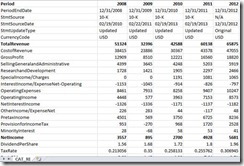
From its income statement, Caterpillar has total revenue $65875M and net income $5681M in 2012. Because Profit Margin = Net Income / Revenue
=> Caterpillar’s profit margin in 2012 = 5681/65875 = 8.62%
Commentary
Profit Margin is used to measure business’s profitability. Higher profit margin generally indicates the company has higher profitability. However, from investors’ point of view, high profit margin doesn’t mean it will have high return on equity, which is the major ratio investors are looking for. It is possible that a company can have high profit margin yet its return on equity is low. Besides that, profit margin may vary among different industries. However, it is still a valuable indicator because investors can calculate the profit margin year by year based on the company’s historical financial statement for internal comparison


